Android 环境设置
PlayNANOO 支持在 Android 环境下使用 Apple ID 服务。 为激活 Apple ID 进行环境设置。
激活 Sign In With Apple
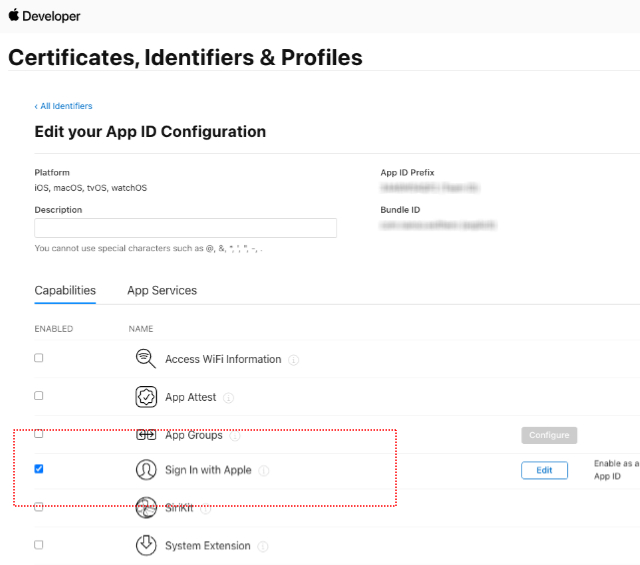
- 在 Apple 开发者页面的 Certificates, Identifiers & Profiles > Identifiers 中激活对应项目的 Sign In with Apple 服务。
添加 Service IDs
- 在 Apple 开发者页面的 Certificates, Identifiers & Profiles > Identifiers 中选择后添加 Service ID。


- Service IDs 的 Identifier 请输入与 App ID 的 Identifier 不同的值。

- 点击 Sign In with Apple 的 Configure。
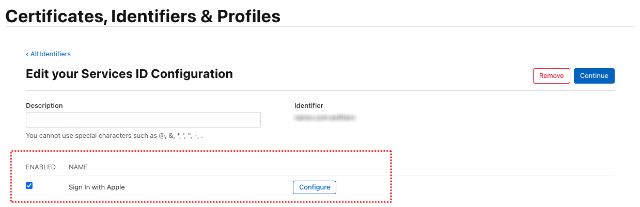
- Primary App ID 选择要使用的项目。
- Domains and Subdomains 输入 playnanoo.com。
- Return URLs 输入 https://service-account.playnanoo.com/apple/callback。

生成并下载 Key
- 在 Apple 开发者页面的 Certificates, Identifiers & Profiles > Keys 中选择后添加 Key。

- 激活 Sign in with Apple 后点击 Configure。

- 选择 Primary App ID。

- 下载生成的密钥信息并妥善保管。

PlayNANOO 控制台设置
- 登录 PlayNANOO 控制台后前往对应频道的设置 > API 及平台管理。
- 在 iOS 设置中输入以下信息:
- Bundle Identifier:输入在 Identifiers 中注册的项目 Bundle ID。
- App ID:输入 AppStore 项目的 Apple ID。
- Team ID:输入在 Identifiers 中注册的项目 Team ID(App ID Prefix)。
- Service ID:输入在 Identifiers 中注册的 Service IDs 的 Identifier 信息。
- Key ID:输入生成的 Key 信息的 Identifier 信息。
- Key File:上传生成 Key 信息时下载的密钥文件。