Sign in with Google 环境设置 (v1 兼容)
- Google登录Web认证方式。与Google v1方式兼容。
- 为使用Google账号进行环境设置。
注册Google用户OAuth客户端ID
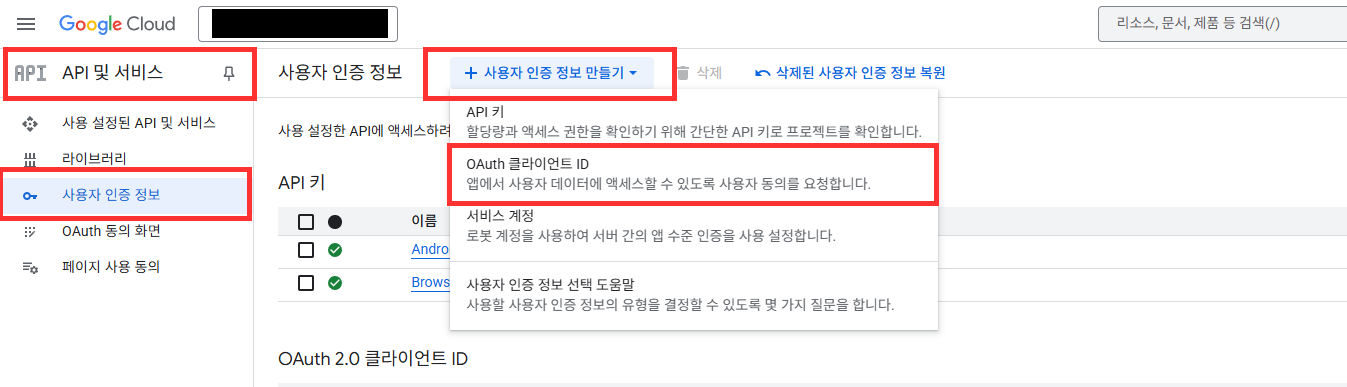
- 在Google Cloud Platform > 凭据 > 创建凭据 > 选择OAuth客户端ID。
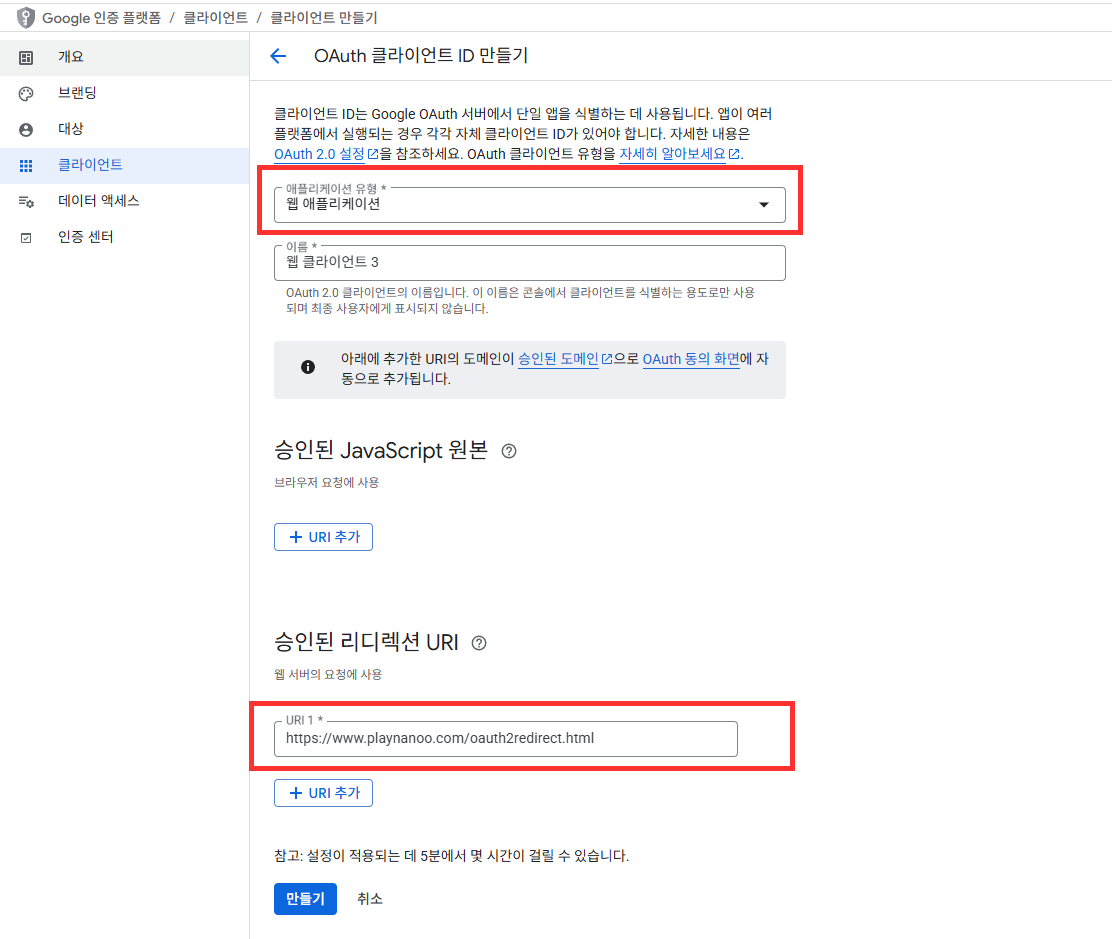
- 选择应用程序类型为Web application。
- 添加以下 2 个授权重定向 URI:
https://www.playnanoo.com/oauth2redirect.html(向后兼容)https://www.playnanoo.com/oauth2redirect.html?v=2(新版本)
- 确认已添加的OAuth客户端ID的客户端ID信息。
注册Google用户OAuth客户端ID (iOS)
- 在Google Cloud Platform > 凭据 > 创建凭据 > 选择OAuth客户端ID。
- 选择应用程序类型为iOS后输入其他信息并完成。
- 选择已添加的OAuth客户端ID后下载PLIST信息。
- 将下载的PLIST文件名更改为GoogleService-Info.plist。

Unreal Engine插件设置
- 使用Unreal Engine的Google Play Services插件或第三方Google认证插件。
- iOS可以使用Online Subsystem iOS。
- Android可以使用Google Play Games Services插件。
xCode设置(iOS)
- 使用CocoaPods项目运行xCode项目。
- 将从Google Cloud Platform下载的GoogleService-Info.plist添加到项目中。

- 将Google Cloud Platform的iOS URL Schema信息注册到URLType的URL Schemes。
- URL Schemes信息是GameService-Info.plist中的REVERSED_CLIENT_ID值。

Unreal Deep Link注册流程 Android
Deep Link scheme变更说明
原有的mygame共享scheme已被deprecated。
当安装了多个使用相同scheme的应用时,认证完成后会出现返回错误应用的问题。
必须使用在PlayNANOO控制台注册的Game ID作为scheme。
Game ID可在PlayNANOO控制台 > 游戏&应用设置页面的"游戏&应用ID"项中确认。
- 在Project Settings > Android > Advanced APK Packaging中添加以下设置:
- 在Extra Tags for Application Manifest中添加以下XML:
- 将
android:scheme值设置为在PlayNANOO控制台注册的Game ID。
<intent-filter>
    <action android:name="android.intent.action.VIEW" />
    <category android:name="android.intent.category.DEFAULT" />
    <category android:name="android.intent.category.BROWSABLE" />
    <data android:scheme="{your_game_id}" />
</intent-filter>
设置示例
当PlayNANOO控制台注册的Game ID为yourgameid时:
<intent-filter>
    <action android:name="android.intent.action.VIEW" />
    <category android:name="android.intent.category.DEFAULT" />
    <category android:name="android.intent.category.BROWSABLE" />
    <data android:scheme="yourgameid" />
</intent-filter>
Unreal Deep Link注册流程 iOS
- 在Project Settings > iOS > Extra PList Data中添加以下内容:
- 将
CFBundleURLSchemes值设置为在PlayNANOO控制台注册的Game ID。
<key>CFBundleURLTypes</key>
<array>
  <dict>
    <key>CFBundleURLSchemes</key>
    <array>
      <string>{your_game_id}</string>
    </array>
    <key>CFBundleURLName</key>
    <string>com.mycompany.{your_game_id}</string>
  </dict>
</array>
设置示例
当PlayNANOO控制台注册的Game ID为yourgameid时:
<key>CFBundleURLTypes</key>
<array>
  <dict>
    <key>CFBundleURLSchemes</key>
    <array>
      <string>yourgameid</string>
    </array>
    <key>CFBundleURLName</key>
    <string>com.mycompany.yourgameid</string>
  </dict>
</array>
Android Chrome Custom Tabs设置(可选)
在Android中要以应用内覆盖形式打开浏览器,需要Chrome Custom Tabs库。 如果没有该库,将自动使用外部浏览器打开。
使用UPL(Unreal Plugin Language)时
- 在项目的
YourProject_UPL.xml文件中添加以下内容:
<buildGradleAdditions>
  <insert>
    dependencies {
      implementation 'androidx.browser:browser:1.5.0'
    }
  </insert>
</buildGradleAdditions>
直接修改Build.gradle时
- 在
[项目]/Build/Android/gradle/build.gradle文件中添加以下依赖。
dependencies {
    implementation 'androidx.browser:browser:1.5.0'
}
ProGuard设置
- 在项目的ProGuard配置文件中添加以下规则。
- 防止ProGuard/R8删除Chrome Custom Tabs类。
-keep class androidx.browser.customtabs.** { *; }
信息
如果未包含Chrome Custom Tabs库,SDK将自动fallback到外部Chrome浏览器。 使用外部浏览器时功能也能正常运行,通过Deep Link返回应用。
Deprecated: 原有mygame scheme方式
Deprecated(SDK 5.x之前版本)
以下方式请勿再使用。
所有应用共享相同的mygame:// scheme,当同一设备上安装了2个以上使用PlayNANOO SDK的应用时,认证完成后会出现返回错误应用的问题。
新方式中使用在PlayNANOO控制台注册的Game ID作为scheme,可以实现每个应用的唯一标识。
原有方式(仅供参考)
Android(原有)
<intent-filter>
    <action android:name="android.intent.action.VIEW" />
    <category android:name="android.intent.category.DEFAULT" />
    <category android:name="android.intent.category.BROWSABLE" />
    <data android:scheme="mygame" android:host="oauth2redirect" />
</intent-filter>
iOS(原有)
<key>CFBundleURLTypes</key>
<array>
  <dict>
    <key>CFBundleURLSchemes</key>
    <array>
      <string>mygame</string>
    </array>
    <key>CFBundleURLName</key>
    <string>com.mycompany.mygame</string>
  </dict>
</array>