Sign in with Google 환경 설정 (v1 호환)
- 구글 로그인 웹 인증 방식 입니다. google v1 방식 과 호환 가능 합니다.
- 구글 계정 활용을 위하여 환경설정을 합니다.
구글 사용자 OAuth 클라이언트 ID 등록
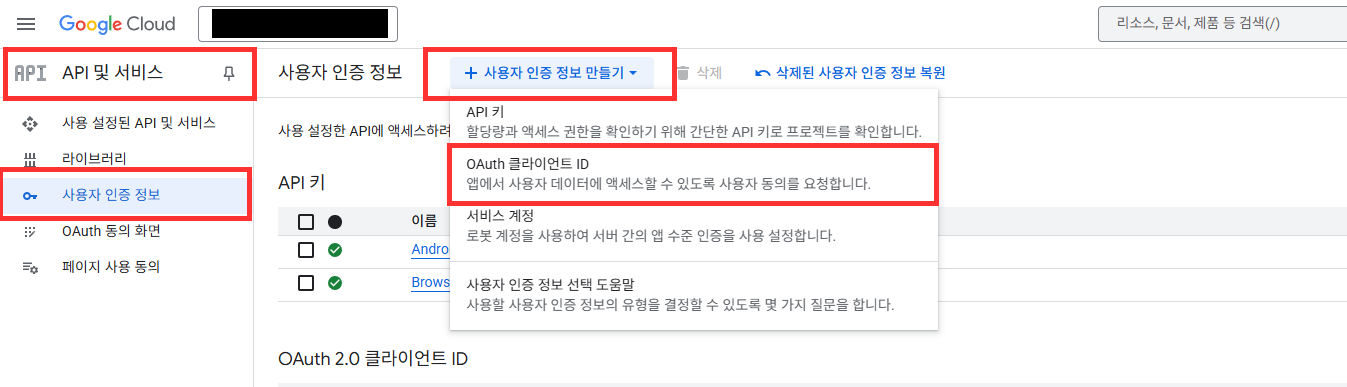
- Google Cloud Platform > 사용자 인증 정보 > 사용자 인증 정보 만들기 > OAuth 클라이언트 ID 선택합니다.
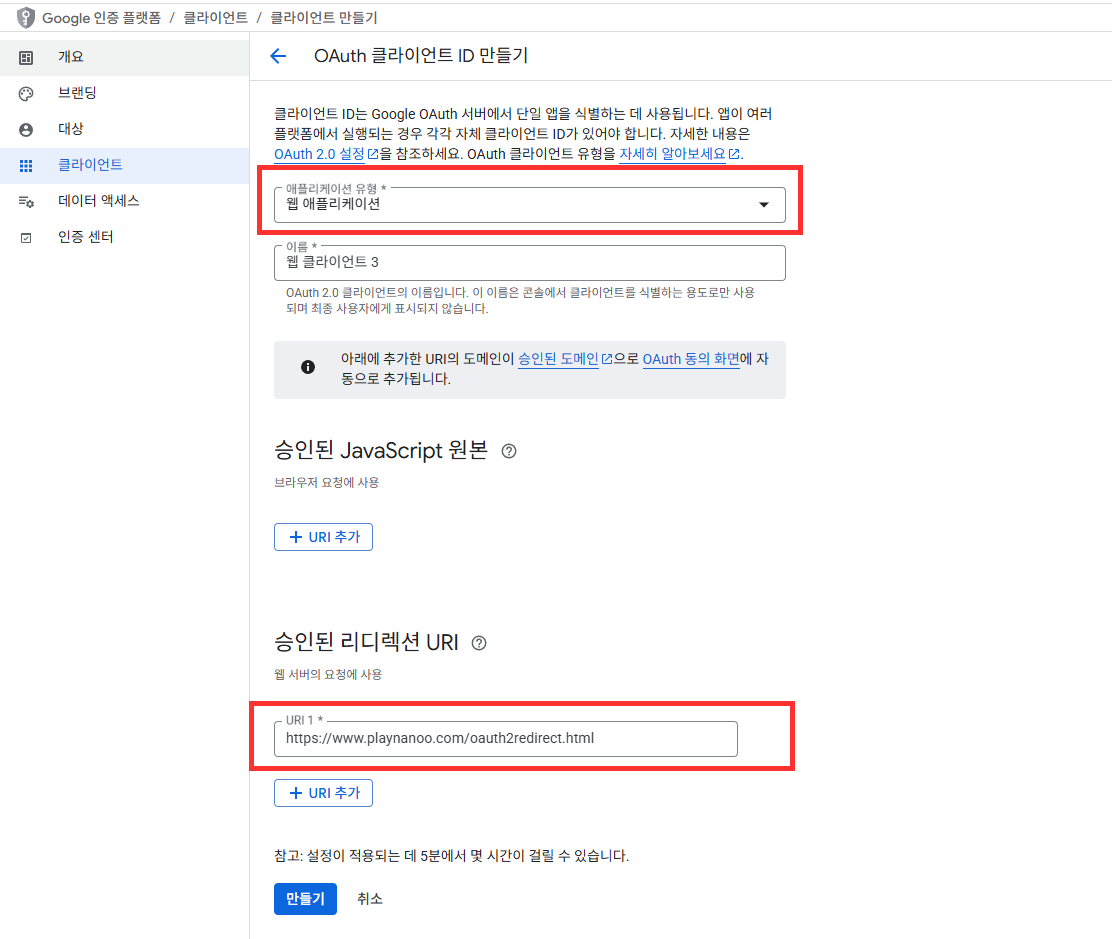
- 어플리케이션 유형을 Wep application 로 선택 합니다.
- 승인된 리디렉션 URI : 다음 2개 URL을 모두 추가 합니다.
https://www.playnanoo.com/oauth2redirect.html(기존 버전 호환용)https://www.playnanoo.com/oauth2redirect.html?v=2(신규 버전)
- 추가 된 OAuth 클라이언트 ID의 클라이언트 ID 정보를 확인 합니다.
구글 사용자 OAuth 클라이언트 ID 등록 (iOS)
- Google Cloud Platform > 사용자 인증 정보 > 사용자 인증 정보 만들기 > OAuth 클라이언트 ID 선택합니다.
- 어플리케이션 유형을 iOS 로 선택 후 기타 정보를 입력 후 완료 합니다.
- 추가 된 OAuth 클라이언트 ID 선택 후 PLIST 정보를 다운로드 합니다.
- 다운받은 PLIST 파일명을 GoogleService-Info.plist 로 변경합니다.

Unreal Engine 플러그인 설정
- Unreal Engine용 Google Play Services 플러그인 또는 서드파티 Google 인증 플러그인을 사용합니다.
- iOS의 경우 Online Subsystem iOS를 활용할 수 있습니다.
- Android의 경우 Google Play Games Services 플러그인을 사용할 수 있습니다.
xCode 설정 (iOS)
- xCode 프로젝트는 CocoaPods 프로젝트로 실행합니다.
- Google Cloud Platform 에서 다운로드 한 GoogleService-Info.plist 을 프로젝트에 추가 합니다.

- Google Cloud Platform 의 iOS URL 스키마 정보를 URLType 의 URL Schemes에 등록합니다.
- URL Schemes 정보는 GameService-Info.plist 의 REVERSED_CLIENT_ID 값입니다.

Unreal 딥링크 등록 절차 Android
딥링크 scheme 변경 안내
기존 mygame 공유 scheme은 deprecated 되었습니다.
동일 scheme을 사용하는 앱이 여러 개 설치된 경우, 인증 완료 후 잘못된 앱으로 복귀하는 문제가 발생합니다.
PlayNANOO 콘솔에 등록된 Game ID를 scheme으로 사용해야 합니다.
Game ID는 PlayNANOO 콘솔 > 게임&앱 설정 페이지의 "게임&앱 ID" 항목에서 확인할 수 있습니다.
- Project Settings > Android > Advanced APK Packaging에서 다음 설정을 추가합니다:
- Extra Tags for Application Manifest에 다음 XML을 추가:
android:scheme값을 PlayNANOO 콘솔에 등록된 Game ID로 설정 합니다.
<intent-filter>
    <action android:name="android.intent.action.VIEW" />
    <category android:name="android.intent.category.DEFAULT" />
    <category android:name="android.intent.category.BROWSABLE" />
    <data android:scheme="{your_game_id}" />
</intent-filter>
설정 예시
PlayNANOO 콘솔에 등록된 Game ID가 yourgameid인 경우:
<intent-filter>
    <action android:name="android.intent.action.VIEW" />
    <category android:name="android.intent.category.DEFAULT" />
    <category android:name="android.intent.category.BROWSABLE" />
    <data android:scheme="yourgameid" />
</intent-filter>
Unreal 딥링크 등록 절차 iOS
- Project Settings > iOS > Extra PList Data에 다음 내용을 추가:
CFBundleURLSchemes값을 PlayNANOO 콘솔에 등록된 Game ID로 설정 합니다.
<key>CFBundleURLTypes</key>
<array>
  <dict>
    <key>CFBundleURLSchemes</key>
    <array>
      <string>{your_game_id}</string>
    </array>
    <key>CFBundleURLName</key>
    <string>com.mycompany.{your_game_id}</string>
  </dict>
</array>
설정 예시
PlayNANOO 콘솔에 등록된 Game ID가 yourgameid인 경우:
<key>CFBundleURLTypes</key>
<array>
  <dict>
    <key>CFBundleURLSchemes</key>
    <array>
      <string>yourgameid</string>
    </array>
    <key>CFBundleURLName</key>
    <string>com.mycompany.yourgameid</string>
  </dict>
</array>
Android Chrome Custom Tabs 설정 (선택사항)
Android에서 앱 내 오버레이 형태로 브라우저를 띄우려면 Chrome Custom Tabs 라이브러리가 필요합니다. 라이브러리가 없으면 자동으로 외부 브라우저로 열립니다.
UPL (Unreal Plugin Language) 사용 시
- 프로젝트의
YourProject_UPL.xml파일에 다음을 추가합니다:
<buildGradleAdditions>
  <insert>
    dependencies {
      implementation 'androidx.browser:browser:1.5.0'
    }
  </insert>
</buildGradleAdditions>
Build.gradle 직접 수정 시
[프로젝트]/Build/Android/gradle/build.gradle파일에 아래 의존성을 추가합니다.
dependencies {
    implementation 'androidx.browser:browser:1.5.0'
}
ProGuard 설정
- 프로젝트의 ProGuard 설정 파일에 아래 규칙을 추가합니다.
- ProGuard/R8이 Chrome Custom Tabs 클래스를 제거하지 않도록 합니다.
-keep class androidx.browser.customtabs.** { *; }
정보
Chrome Custom Tabs 라이브러리가 포함되지 않은 경우, SDK는 자동으로 외부 Chrome 브라우저로 fallback 합니다. 외부 브라우저 사용 시에도 기능은 정상 동작하며, 딥링크를 통해 앱으로 복귀합니다.
Deprecated: 기존 mygame scheme 방식
Deprecated (SDK 5.x 이전 버전)
아래 방식은 더 이상 사용하지 마십시오.
모든 앱이 동일한 mygame:// scheme을 공유하여, 동일 기기에 PlayNANOO SDK를 사용하는 앱이 2개 이상 설치된 경우 인증 완료 후 잘못된 앱으로 복귀하는 문제가 발생합니다.
신규 방식에서는 PlayNANOO 콘솔에 등록된 Game ID를 scheme으로 사용하여 앱별 고유 식별이 가능합니다.
기존 방식 (참고용)
Android (기존)
<intent-filter>
    <action android:name="android.intent.action.VIEW" />
    <category android:name="android.intent.category.DEFAULT" />
    <category android:name="android.intent.category.BROWSABLE" />
    <data android:scheme="mygame" android:host="oauth2redirect" />
</intent-filter>
iOS (기존)
<key>CFBundleURLTypes</key>
<array>
  <dict>
    <key>CFBundleURLSchemes</key>
    <array>
      <string>mygame</string>
    </array>
    <key>CFBundleURLName</key>
    <string>com.mycompany.mygame</string>
  </dict>
</array>