Sign in with Google Environment Settings (v1 Compatible)
- This is Google login web authentication method. Compatible with Google v1 method.
- Configure the environment to use Google accounts.
Register Google User OAuth Client ID
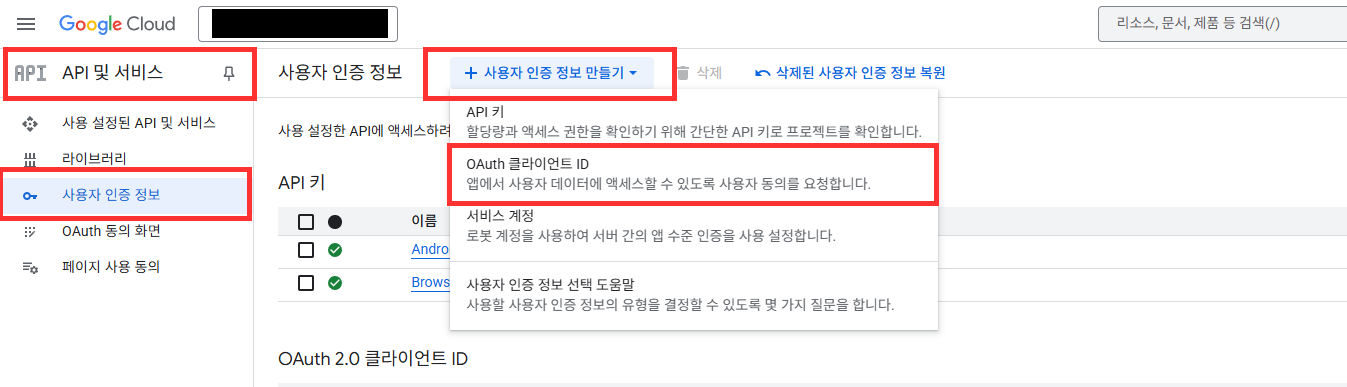
- Go to Google Cloud Platform > Credentials > Create Credentials > Select OAuth client ID.
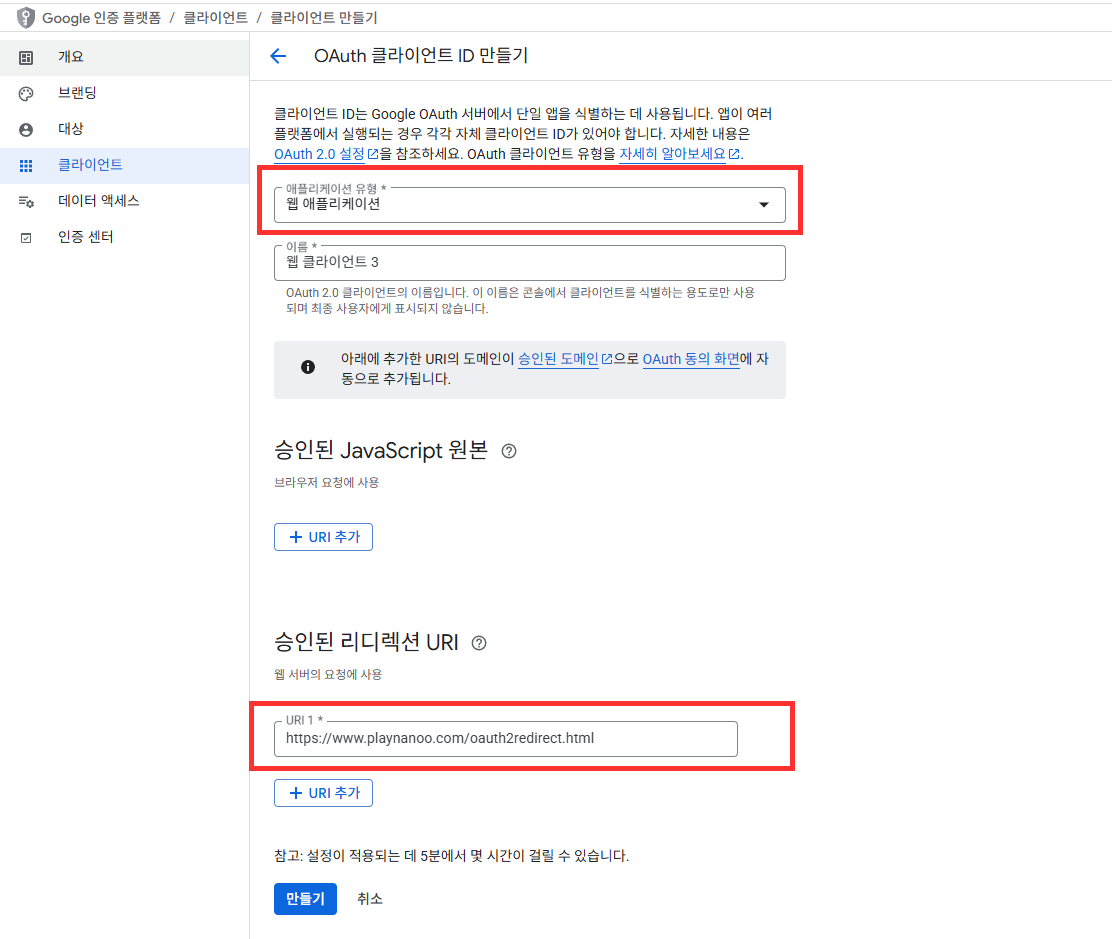
- Select Web application as the application type.
- Add the following 2 URLs to Authorized redirect URIs:
https://www.playnanoo.com/oauth2redirect.html(for backward compatibility)https://www.playnanoo.com/oauth2redirect.html?v=2(for new version)
- Check the client ID information of the added OAuth client ID.
Register Google User OAuth Client ID (iOS)
- Go to Google Cloud Platform > Credentials > Create Credentials > Select OAuth client ID.
- Select iOS as the application type, enter other information and complete.
- Select the added OAuth client ID and download the PLIST information.
- Rename the downloaded PLIST file to GoogleService-Info.plist.

Register Google Game SDK
- Download the Google Game Unity Package.
- Import the Google Game Unity Package into your project.
- Google Game is required for iOS, and optional for Android.
Download Google Game Unity Package
Register Google Authentication SDK
- Download the Google Authentication Unity Package.
- Import the Google Authentication Unity Package into your project.
- Remove some files when importing the Google Authentication Unity Package to prevent conflicts and errors.
Download Google Authentication Unity Package

xCode Settings (iOS)
- Run the xCode project as a CocoaPods project.
- Add the GoogleService-Info.plist downloaded from Google Cloud Platform to your project.

- Change the GoogleSignIn version information in CocoaPods. Some versions may conflict with the Google Authentication SDK.
- After changing pod information, run pod install to complete the installation of that service.

- Register the iOS URL scheme information from Google Cloud Platform in URLType's URL Schemes.
- URL Schemes information is the REVERSED_CLIENT_ID value from GameService-Info.plist.

Unity Deep Link Registration Procedure Android
The existing shared mygame scheme has been deprecated.
When multiple apps using the same scheme are installed, there is an issue where the user is returned to the wrong app after authentication.
The SDK automatically uses the Game ID registered in the PlayNANOO console as the scheme, so no separate scheme configuration is needed.
The Game ID can be found on the PlayNANOO Console > Game & App Settings page under the "Game & App ID" field.
- Create an AndroidDeepLinkPostProcessor.cs file in the Assets/Editor/ folder and add the following content.
- The SDK automatically uses the Game ID registered in PlayNANOO Settings as the deep link scheme.
#if UNITY_EDITOR
using UnityEditor;
using UnityEditor.Android;
using System.IO;
using System.Xml;

public class AndroidDeepLinkPostProcessor : IPostGenerateGradleAndroidProject
{
    public int callbackOrder => 999;

    public void OnPostGenerateGradleAndroidProject(string path)
    {
        string manifestPath = Path.Combine(path, "src/main/AndroidManifest.xml");

        if (!File.Exists(manifestPath))
        {
            UnityEngine.Debug.LogError("[DeepLink] AndroidManifest.xml not found!");
            return;
        }

        // PlayNANOOSettings에서 game_id 로드
        PlayNANOOSettings settings = AssetDatabase.LoadAssetAtPath<PlayNANOOSettings>(
            "Assets/PlayNANOO/Resources/PlayNANOOSettings.asset");

        if (settings == null || string.IsNullOrEmpty(settings.gameID))
        {
            UnityEngine.Debug.LogError("[DeepLink] PlayNANOOSettings not found or gameID is empty!");
            return;
        }

        string gameId = settings.gameID;

        XmlDocument manifest = new();
        manifest.Load(manifestPath);

        XmlNamespaceManager nsmgr = new(manifest.NameTable);
        nsmgr.AddNamespace("android", "http://schemas.android.com/apk/res/android");

        AddDeepLinkIntentFilter(manifest, nsmgr, gameId);
        AddInternetPermission(manifest, nsmgr);
        AddBrowserQueries(manifest, nsmgr);

        manifest.Save(manifestPath);
        UnityEngine.Debug.Log($"[DeepLink] AndroidManifest 설정 완료 (scheme: {gameId})");
    }

    private void AddDeepLinkIntentFilter(XmlDocument manifest, XmlNamespaceManager nsmgr, string gameId)
    {
        XmlNode applicationNode = manifest.SelectSingleNode("/manifest/application", nsmgr);
        XmlNode activityNode = applicationNode?.SelectSingleNode(
            "activity[@android:name='com.unity3d.player.UnityPlayerActivity']", nsmgr);
        activityNode ??= applicationNode?.SelectSingleNode(
            "activity[contains(@android:name, 'UnityPlayerActivity')]", nsmgr);

        if (activityNode == null)
        {
            UnityEngine.Debug.LogError("[DeepLink] UnityPlayerActivity not found!");
            return;
        }

        // 이미 game_id scheme 딥링크가 있는지 확인
        XmlNodeList intentFilters = activityNode.SelectNodes("intent-filter", nsmgr);
        foreach (XmlNode filter in intentFilters)
        {
            XmlNode dataNode = filter.SelectSingleNode(
                $"data[@android:scheme='{gameId}']", nsmgr);
            if (dataNode != null)
            {
                UnityEngine.Debug.Log($"[DeepLink] 딥링크 이미 등록됨 (scheme: {gameId})");
                return;
            }
        }

        // 딥링크 Intent Filter 생성
        XmlElement intentFilter = manifest.CreateElement("intent-filter");

        XmlElement action = manifest.CreateElement("action");
        action.SetAttribute("name", "http://schemas.android.com/apk/res/android",
            "android.intent.action.VIEW");
        intentFilter.AppendChild(action);

        XmlElement categoryDefault = manifest.CreateElement("category");
        categoryDefault.SetAttribute("name", "http://schemas.android.com/apk/res/android",
            "android.intent.category.DEFAULT");
        intentFilter.AppendChild(categoryDefault);

        XmlElement categoryBrowsable = manifest.CreateElement("category");
        categoryBrowsable.SetAttribute("name", "http://schemas.android.com/apk/res/android",
            "android.intent.category.BROWSABLE");
        intentFilter.AppendChild(categoryBrowsable);

        XmlElement data = manifest.CreateElement("data");
        data.SetAttribute("scheme", "http://schemas.android.com/apk/res/android", gameId);
        intentFilter.AppendChild(data);

        activityNode.AppendChild(intentFilter);
        UnityEngine.Debug.Log($"[DeepLink] 딥링크 Intent Filter 추가 완료 (scheme: {gameId})");
    }

    private void AddInternetPermission(XmlDocument manifest, XmlNamespaceManager nsmgr)
    {
        XmlNode existingPermission = manifest.SelectSingleNode(
            "/manifest/uses-permission[@android:name='android.permission.INTERNET']", nsmgr);
        if (existingPermission != null) return;

        XmlElement permission = manifest.CreateElement("uses-permission");
        permission.SetAttribute("name", "http://schemas.android.com/apk/res/android",
            "android.permission.INTERNET");

        XmlNode manifestNode = manifest.SelectSingleNode("/manifest");
        manifestNode?.AppendChild(permission);
    }

    private void AddBrowserQueries(XmlDocument manifest, XmlNamespaceManager nsmgr)
    {
        XmlNode existingQueries = manifest.SelectSingleNode("/manifest/queries", nsmgr);
        if (existingQueries != null) return;

        XmlElement queries = manifest.CreateElement("queries");
        XmlElement intent = manifest.CreateElement("intent");

        XmlElement action = manifest.CreateElement("action");
        action.SetAttribute("name", "http://schemas.android.com/apk/res/android",
            "android.intent.action.VIEW");
        intent.AppendChild(action);

        XmlElement category = manifest.CreateElement("category");
        category.SetAttribute("name", "http://schemas.android.com/apk/res/android",
            "android.intent.category.BROWSABLE");
        intent.AppendChild(category);

        XmlElement data = manifest.CreateElement("data");
        data.SetAttribute("scheme", "http://schemas.android.com/apk/res/android", "https");
        intent.AppendChild(data);

        queries.AppendChild(intent);

        XmlNode manifestNode = manifest.SelectSingleNode("/manifest");
        manifestNode?.AppendChild(queries);
    }
}
#endif
If the Game ID registered in the PlayNANOO console is yourgameid, the following will be registered in AndroidManifest.xml during the build.
<intent-filter>
    <action android:name="android.intent.action.VIEW" />
    <category android:name="android.intent.category.DEFAULT" />
    <category android:name="android.intent.category.BROWSABLE" />
    <data android:scheme="yourgameid" />
</intent-filter>
Unity Deep Link Registration Procedure iOS
- Add the following content to Info.plist.
- Set the
CFBundleURLSchemesvalue to the Game ID registered in the PlayNANOO console.
<key>CFBundleURLTypes</key>
<array>
  <dict>
    <key>CFBundleURLSchemes</key>
    <array>
      <string>{your_game_id}</string>
    </array>
    <key>CFBundleURLName</key>
    <string>com.mycompany.{your_game_id}</string>
  </dict>
</array>
If the Game ID registered in the PlayNANOO console is yourgameid:
<key>CFBundleURLTypes</key>
<array>
  <dict>
    <key>CFBundleURLSchemes</key>
    <array>
      <string>yourgameid</string>
    </array>
    <key>CFBundleURLName</key>
    <string>com.mycompany.yourgameid</string>
  </dict>
</array>
Android Chrome Custom Tabs Settings (Optional)
To open the browser in an in-app overlay form on Android, the Chrome Custom Tabs library is required. If the library is not present, it will automatically open in an external browser.
mainTemplate.gradle Settings
- Add the following dependency to the
Assets/Plugins/Android/mainTemplate.gradlefile.
dependencies {
    implementation 'androidx.browser:browser:1.5.0'
    // ... 기존 의존성들
}
When Using Custom Build
- Check "Custom Main Gradle Template" in Project Settings > Player > Android > Publishing Settings.
- Add the above dependency to the generated
mainTemplate.gradlefile.
ProGuard Settings
- Add the following rules to the
Assets/Plugins/Android/proguard-user.txtfile. - Prevents ProGuard/R8 from removing Chrome Custom Tabs classes.
-keep class androidx.browser.customtabs.** { *; }
If the Chrome Custom Tabs library is not included, the SDK automatically falls back to an external Chrome browser. The functionality works normally even when using an external browser, and the app is returned via deep link.
Deprecated: Legacy mygame Scheme Method
Do not use the method below anymore.
All apps share the same mygame:// scheme, so when two or more apps using the PlayNANOO SDK are installed on the same device, there is an issue where the user is returned to the wrong app after authentication.
In the new method, the SDK automatically uses the Game ID registered in the PlayNANOO console as the scheme, enabling unique identification per app.
Legacy Method (for reference)
Android (Legacy)
#if UNITY_EDITOR
using UnityEditor;
using UnityEditor.Android;
using System.IO;

public class AndroidDeepLinkPostProcessor : IPostGenerateGradleAndroidProject
{
    public int callbackOrder => 999;

    public void OnPostGenerateGradleAndroidProject(string path)
    {
        string manifestPath = Path.Combine(path, "src/main/AndroidManifest.xml");

        if (!File.Exists(manifestPath))
        {
            UnityEngine.Debug.LogError("[DeepLink] AndroidManifest.xml not found!");
            return;
        }

        string manifest = File.ReadAllText(manifestPath);

        if (!manifest.Contains("mygame://oauth2redirect"))
        {
            string intentFilter = @"
<intent-filter>
    <action android:name=""android.intent.action.VIEW"" />
    <category android:name=""android.intent.category.DEFAULT"" />
    <category android:name=""android.intent.category.BROWSABLE"" />
    <data android:scheme=""mygame"" android:host=""oauth2redirect"" />
</intent-filter>";

            manifest = manifest.Replace(
                "</activity>",
                intentFilter + "\n</activity>"
            );

            File.WriteAllText(manifestPath, manifest);
            UnityEngine.Debug.Log("[DeepLink]  AndroidManifest 딥링크 등록 완료");
        }
        else
        {
            UnityEngine.Debug.Log("[DeepLink] AndroidManifest 이미 등록됨");
        }
    }
}
#endif
iOS (Legacy)
<key>CFBundleURLTypes</key>
<array>
  <dict>
    <key>CFBundleURLSchemes</key>
    <array>
      <string>mygame</string>
    </array>
    <key>CFBundleURLName</key>
    <string>com.mycompany.mygame</string>
  </dict>
</array>