Sign in with Google 环境设置(v1 兼容)
- Google 登录的网页认证方式。与 Google v1 方式兼容。
- 为使用 Google 账户进行环境设置。
Google 用户 OAuth 客户端 ID 注册
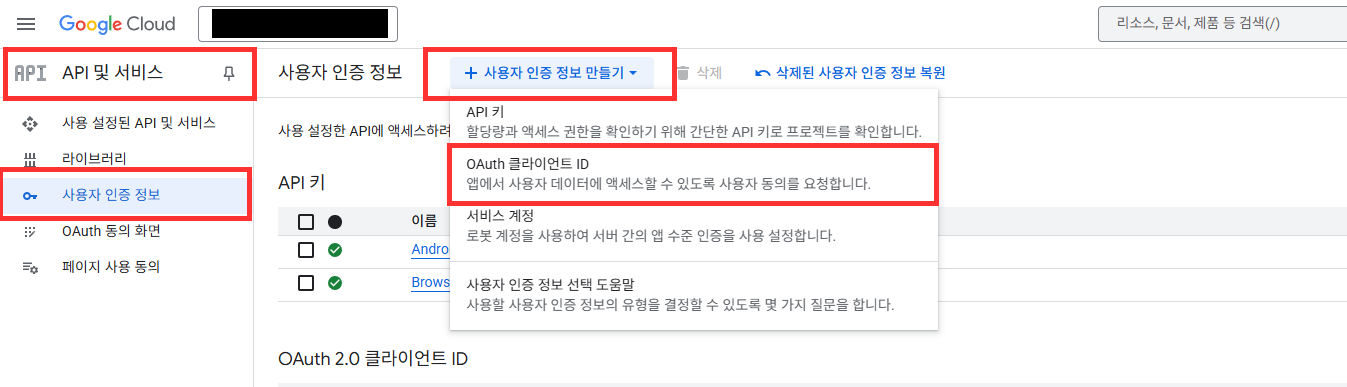
- 在 Google Cloud Platform > 用户凭据 > 创建用户凭据 > 选择 OAuth 客户端 ID。
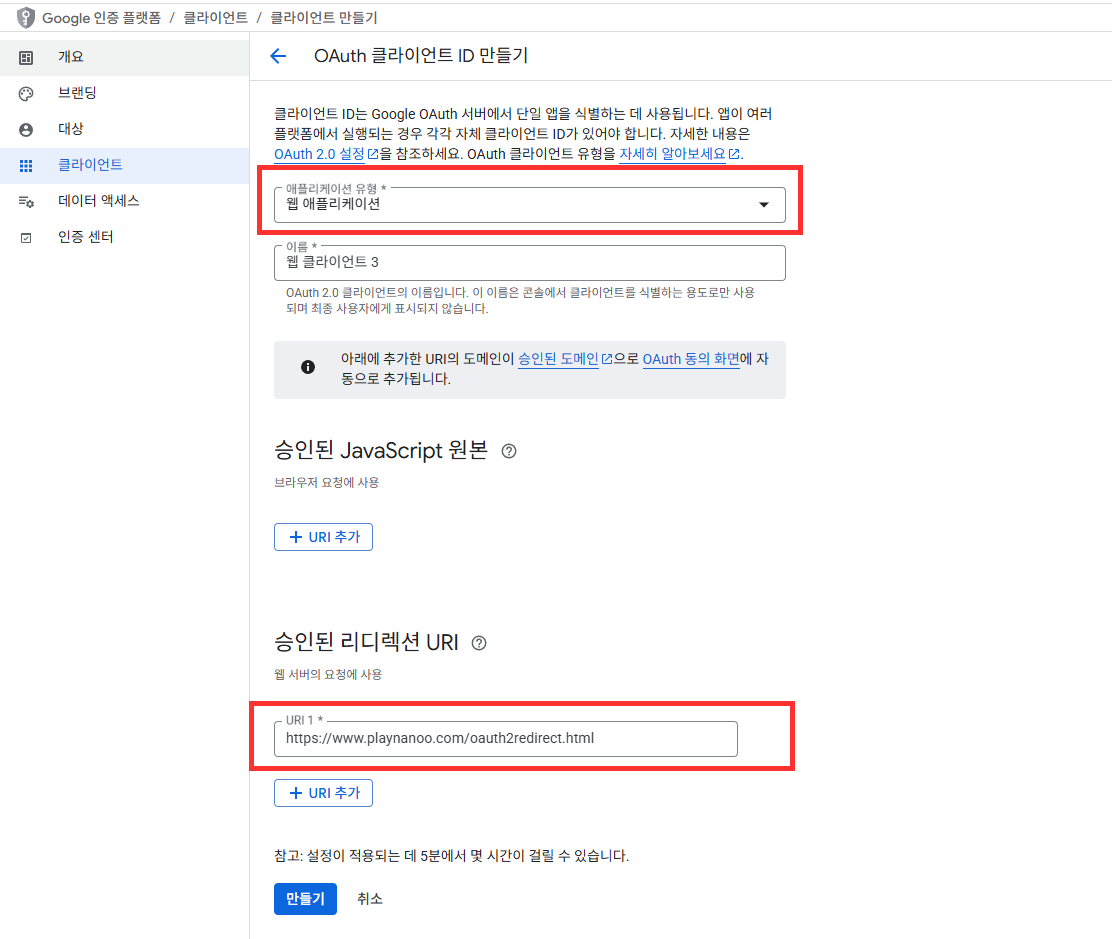
- 应用程序类型选择 Web application。
- 授权重定向 URI:添加以下 2 个 URL:
https://www.playnanoo.com/oauth2redirect.html(向后兼容)https://www.playnanoo.com/oauth2redirect.html?v=2(新版本)
- 确认已添加的 OAuth 客户端 ID 的客户端 ID 信息。
Google 用户 OAuth 客户端 ID 注册(iOS)
- 在 Google Cloud Platform > 用户凭据 > 创建用户凭据 > 选择 OAuth 客户端 ID。
- 应用程序类型选择 iOS,输入其他信息后完成。
- 选择已添加的 OAuth 客户端 ID 后下载 PLIST 信息。
- 将下载的 PLIST 文件名更改为 GoogleService-Info.plist。

Google 游戏 SDK 注册
- 下载 Google 游戏 Unity Package。
- 将 Google 游戏 Unity Package 导入到项目中。
- Google 游戏在 iOS 上为必需,Android 上为可选。
Google 认证 SDK 注册
- 下载 Google 认证 Unity Package。
- 将 Google 认证 Unity Package 导入到项目中。
- 导入 Google 认证 Unity Package 时,为防止冲突和错误需要移除部分文件。

xCode 设置(iOS)
- xCode 项目以 CocoaPods 项目方式运行。
- 将从 Google Cloud Platform 下载的 GoogleService-Info.plist 添加到项目中。

- 更改 CocoaPods 的 GoogleSignIn 版本信息。某些版本可能与 Google 认证 SDK 产生冲突。
- 更改 pod 信息后执行 pod install 完成该服务的安装。

- 将 Google Cloud Platform 的 iOS URL Schema 信息注册到 URLType 的 URL Schemes 中。
- URL Schemes 信息为 GameService-Info.plist 的 REVERSED_CLIENT_ID 值。

Unity 深度链接注册步骤 Android
深度链接 scheme 变更通知
原有的 mygame 共享 scheme 已被 deprecated。
当使用相同 scheme 的应用安装了多个时,认证完成后会出现返回到错误应用的问题。
SDK 会自动使用在 PlayNANOO 控制台注册的 Game ID 作为 scheme,无需单独设置 scheme。
Game ID 可在 PlayNANOO 控制台 > 游戏&应用设置 页面的 "游戏&应用 ID" 项目中确认。
- 在 Assets/Editor/ 文件夹中创建 AndroidDeepLinkPostProcessor.cs 文件并添加以下内容。
- SDK 会自动使用在 PlayNANOO Settings 中注册的 Game ID 作为深度链接 scheme。
#if UNITY_EDITOR
using UnityEditor;
using UnityEditor.Android;
using System.IO;
using System.Xml;

public class AndroidDeepLinkPostProcessor : IPostGenerateGradleAndroidProject
{
    public int callbackOrder => 999;

    public void OnPostGenerateGradleAndroidProject(string path)
    {
        string manifestPath = Path.Combine(path, "src/main/AndroidManifest.xml");

        if (!File.Exists(manifestPath))
        {
            UnityEngine.Debug.LogError("[DeepLink] AndroidManifest.xml not found!");
            return;
        }

        // PlayNANOOSettings에서 game_id 로드
        PlayNANOOSettings settings = AssetDatabase.LoadAssetAtPath<PlayNANOOSettings>(
            "Assets/PlayNANOO/Resources/PlayNANOOSettings.asset");

        if (settings == null || string.IsNullOrEmpty(settings.gameID))
        {
            UnityEngine.Debug.LogError("[DeepLink] PlayNANOOSettings not found or gameID is empty!");
            return;
        }

        string gameId = settings.gameID;

        XmlDocument manifest = new();
        manifest.Load(manifestPath);

        XmlNamespaceManager nsmgr = new(manifest.NameTable);
        nsmgr.AddNamespace("android", "http://schemas.android.com/apk/res/android");

        AddDeepLinkIntentFilter(manifest, nsmgr, gameId);
        AddInternetPermission(manifest, nsmgr);
        AddBrowserQueries(manifest, nsmgr);

        manifest.Save(manifestPath);
        UnityEngine.Debug.Log($"[DeepLink] AndroidManifest 설정 완료 (scheme: {gameId})");
    }

    private void AddDeepLinkIntentFilter(XmlDocument manifest, XmlNamespaceManager nsmgr, string gameId)
    {
        XmlNode applicationNode = manifest.SelectSingleNode("/manifest/application", nsmgr);
        XmlNode activityNode = applicationNode?.SelectSingleNode(
            "activity[@android:name='com.unity3d.player.UnityPlayerActivity']", nsmgr);
        activityNode ??= applicationNode?.SelectSingleNode(
            "activity[contains(@android:name, 'UnityPlayerActivity')]", nsmgr);

        if (activityNode == null)
        {
            UnityEngine.Debug.LogError("[DeepLink] UnityPlayerActivity not found!");
            return;
        }

        // 이미 game_id scheme 딥링크가 있는지 확인
        XmlNodeList intentFilters = activityNode.SelectNodes("intent-filter", nsmgr);
        foreach (XmlNode filter in intentFilters)
        {
            XmlNode dataNode = filter.SelectSingleNode(
                $"data[@android:scheme='{gameId}']", nsmgr);
            if (dataNode != null)
            {
                UnityEngine.Debug.Log($"[DeepLink] 딥링크 이미 등록됨 (scheme: {gameId})");
                return;
            }
        }

        // 딥링크 Intent Filter 생성
        XmlElement intentFilter = manifest.CreateElement("intent-filter");

        XmlElement action = manifest.CreateElement("action");
        action.SetAttribute("name", "http://schemas.android.com/apk/res/android",
            "android.intent.action.VIEW");
        intentFilter.AppendChild(action);

        XmlElement categoryDefault = manifest.CreateElement("category");
        categoryDefault.SetAttribute("name", "http://schemas.android.com/apk/res/android",
            "android.intent.category.DEFAULT");
        intentFilter.AppendChild(categoryDefault);

        XmlElement categoryBrowsable = manifest.CreateElement("category");
        categoryBrowsable.SetAttribute("name", "http://schemas.android.com/apk/res/android",
            "android.intent.category.BROWSABLE");
        intentFilter.AppendChild(categoryBrowsable);

        XmlElement data = manifest.CreateElement("data");
        data.SetAttribute("scheme", "http://schemas.android.com/apk/res/android", gameId);
        intentFilter.AppendChild(data);

        activityNode.AppendChild(intentFilter);
        UnityEngine.Debug.Log($"[DeepLink] 딥링크 Intent Filter 추가 완료 (scheme: {gameId})");
    }

    private void AddInternetPermission(XmlDocument manifest, XmlNamespaceManager nsmgr)
    {
        XmlNode existingPermission = manifest.SelectSingleNode(
            "/manifest/uses-permission[@android:name='android.permission.INTERNET']", nsmgr);
        if (existingPermission != null) return;

        XmlElement permission = manifest.CreateElement("uses-permission");
        permission.SetAttribute("name", "http://schemas.android.com/apk/res/android",
            "android.permission.INTERNET");

        XmlNode manifestNode = manifest.SelectSingleNode("/manifest");
        manifestNode?.AppendChild(permission);
    }

    private void AddBrowserQueries(XmlDocument manifest, XmlNamespaceManager nsmgr)
    {
        XmlNode existingQueries = manifest.SelectSingleNode("/manifest/queries", nsmgr);
        if (existingQueries != null) return;

        XmlElement queries = manifest.CreateElement("queries");
        XmlElement intent = manifest.CreateElement("intent");

        XmlElement action = manifest.CreateElement("action");
        action.SetAttribute("name", "http://schemas.android.com/apk/res/android",
            "android.intent.action.VIEW");
        intent.AppendChild(action);

        XmlElement category = manifest.CreateElement("category");
        category.SetAttribute("name", "http://schemas.android.com/apk/res/android",
            "android.intent.category.BROWSABLE");
        intent.AppendChild(category);

        XmlElement data = manifest.CreateElement("data");
        data.SetAttribute("scheme", "http://schemas.android.com/apk/res/android", "https");
        intent.AppendChild(data);

        queries.AppendChild(intent);

        XmlNode manifestNode = manifest.SelectSingleNode("/manifest");
        manifestNode?.AppendChild(queries);
    }
}
#endif
构建结果示例
如果 PlayNANOO 控制台中注册的 Game ID 为 yourgameid,构建时将在 AndroidManifest.xml 中注册如下内容。
<intent-filter>
    <action android:name="android.intent.action.VIEW" />
    <category android:name="android.intent.category.DEFAULT" />
    <category android:name="android.intent.category.BROWSABLE" />
    <data android:scheme="yourgameid" />
</intent-filter>
Unity 深度链接注册步骤 iOS
- 在 Info.plist 中添加以下内容。
- 将
CFBundleURLSchemes值设置为在 PlayNANOO 控制台注册的 Game ID。
<key>CFBundleURLTypes</key>
<array>
  <dict>
    <key>CFBundleURLSchemes</key>
    <array>
      <string>{your_game_id}</string>
    </array>
    <key>CFBundleURLName</key>
    <string>com.mycompany.{your_game_id}</string>
  </dict>
</array>
设置示例
如果 PlayNANOO 控制台中注册的 Game ID 为 yourgameid:
<key>CFBundleURLTypes</key>
<array>
  <dict>
    <key>CFBundleURLSchemes</key>
    <array>
      <string>yourgameid</string>
    </array>
    <key>CFBundleURLName</key>
    <string>com.mycompany.yourgameid</string>
  </dict>
</array>
Android Chrome Custom Tabs 设置(可选)
在 Android 上,如需以应用内覆盖形式打开浏览器,需要 Chrome Custom Tabs 库。 如果没有该库,将自动以外部浏览器打开。
mainTemplate.gradle 设置
- 在
Assets/Plugins/Android/mainTemplate.gradle文件中添加以下依赖项。
dependencies {
    implementation 'androidx.browser:browser:1.5.0'
    // ... 기존 의존성들
}
使用 Custom Build 时
- 在 Project Settings > Player > Android > Publishing Settings 中勾选 "Custom Main Gradle Template"。
- 在生成的
mainTemplate.gradle文件中添加上述依赖项。
ProGuard 设置
- 在
Assets/Plugins/Android/proguard-user.txt文件中添加以下规则。 - 防止 ProGuard/R8 移除 Chrome Custom Tabs 类。
-keep class androidx.browser.customtabs.** { *; }
信息
如果未包含 Chrome Custom Tabs 库,SDK 将自动回退到外部 Chrome 浏览器。 使用外部浏览器时功能也可正常运行,通过深度链接返回应用。
Deprecated:原有 mygame scheme 方式
Deprecated(SDK 5.x 之前版本)
以下方式请不要再使用。
所有应用共享相同的 mygame:// scheme,当同一设备上安装了 2 个以上使用 PlayNANOO SDK 的应用时,认证完成后会返回到错误的应用。
新方式中 SDK 自动使用在 PlayNANOO 控制台注册的 Game ID 作为 scheme,实现每个应用的唯一标识。
原有方式(仅供参考)
Android(原有)
#if UNITY_EDITOR
using UnityEditor;
using UnityEditor.Android;
using System.IO;

public class AndroidDeepLinkPostProcessor : IPostGenerateGradleAndroidProject
{
    public int callbackOrder => 999;

    public void OnPostGenerateGradleAndroidProject(string path)
    {
        string manifestPath = Path.Combine(path, "src/main/AndroidManifest.xml");

        if (!File.Exists(manifestPath))
        {
            UnityEngine.Debug.LogError("[DeepLink] AndroidManifest.xml not found!");
            return;
        }

        string manifest = File.ReadAllText(manifestPath);

        if (!manifest.Contains("mygame://oauth2redirect"))
        {
            string intentFilter = @"
<intent-filter>
    <action android:name=""android.intent.action.VIEW"" />
    <category android:name=""android.intent.category.DEFAULT"" />
    <category android:name=""android.intent.category.BROWSABLE"" />
    <data android:scheme=""mygame"" android:host=""oauth2redirect"" />
</intent-filter>";

            manifest = manifest.Replace(
                "</activity>",
                intentFilter + "\n</activity>"
            );

            File.WriteAllText(manifestPath, manifest);
            UnityEngine.Debug.Log("[DeepLink]  AndroidManifest 딥링크 등록 완료");
        }
        else
        {
            UnityEngine.Debug.Log("[DeepLink] AndroidManifest 이미 등록됨");
        }
    }
}
#endif
iOS(原有)
<key>CFBundleURLTypes</key>
<array>
  <dict>
    <key>CFBundleURLSchemes</key>
    <array>
      <string>mygame</string>
    </array>
    <key>CFBundleURLName</key>
    <string>com.mycompany.mygame</string>
  </dict>
</array>